> For the complete documentation index, see [llms.txt](https://wiki.roaddirect.co.nz/llms.txt). Markdown versions of documentation pages are available by appending `.md` to page URLs; this page is available as [Markdown](https://wiki.roaddirect.co.nz/mobile-app/on-site-records/site-audits.md).
# Site audits (SCR)
The site audit is the CoPTTM site condition rating (SCR) audit. The form is set out in 13 steps; use **Next** and **Back**, or tap a step, to move between them.
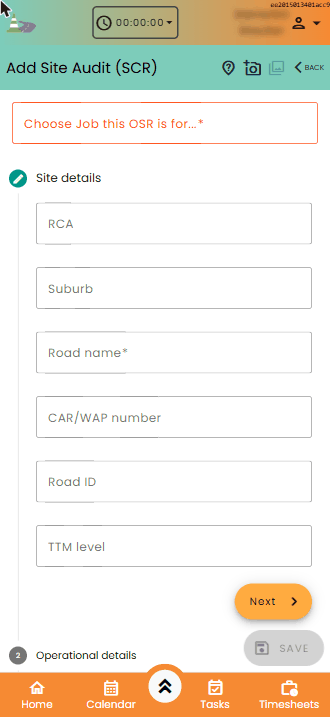
Add Site Audit (SCR): site details
## The steps
1. **Site details**: RCA, suburb, **Road name**, CAR/WAP number, road ID and TTM level.
2. **Operational details**: activity description, TTM method, **TTM Contractor**, the contractor in the working space, and the client/principal.
3. **Signs**
4. **Mobile & Semi Static**
5. **Pedestrians/Cyclists**
6. **Delineation**
7. **Miscellaneous**
8. **Other worksite aspects**: answer each question.
9. **Final result**: the **Score**, and the **Rating**. The rating is suggested from the score, but you can change it. Record the **Actions planned by STMS** and who the site activity was ceased by, if it was.
10. **Key points**: answer the key point questions, and record the key points and actions to be taken.
11. **Audited/reviewed by**: your name, qualifications, TTM ID number, mobile number and **Signature**.
12. **STMS details (received by)**: the STMS's name, qualifications, TTM ID number, mobile number and signature.
13. **Review & submit**: check the summary. Tap **Edit section** to go back and change a section. Add any **Comments**, and the **Email address(es) to forward report to** (separate them with commas). Tap **Save**.
## Scoring
Steps 3 to 7 are the scored checks. For each fault you find, tap **+** against its criterion. Each criterion shows its code (e.g. **A1**), what's counted and its weighting, and each step shows its subtotal in its heading. Tap the comment button on a row to add a comment about it.
Scoring the Signs checks
## Ratings
| Rating | Score |
| ----------------------- | ----------------------------------- |
| High Standard | 0–10 |
| Acceptable | 11–25 |
| Needs Improvement | 26–50 |
| Unacceptable | 51+ |
| Unacceptable - other | Other aspects only |
| Unacceptable - Multiple | Both 51+ and other aspects |
| DANGEROUS | SCR 51+ and *Low risk?* answered No |
---
# Agent Instructions
This documentation is published with GitBook. GitBook is the documentation platform designed so that both humans and AI agents can read, navigate, and reason over technical content effectively. Learn more at gitbook.com.
## Querying This Documentation
If you need additional information that is not directly available in this page, you can query the documentation by asking a question.
Perform an HTTP GET request on the following URL with the `ask` and `goal` query parameters:
```
GET https://wiki.roaddirect.co.nz/mobile-app/on-site-records/site-audits.md?ask=&goal=
```
`ask` is the immediate question: it should be specific, self-contained, and written in natural language.
`goal` is what the user is ultimately trying to achieve, the reason they need the answer. Sharing it helps GitBook give you a better, more relevant answer. A goal is most helpful when it describes the outcome the user wants rather than restating the question. For example, with `ask=how do I create an API token`, a goal like `automate deployments from our CI pipeline` lets GitBook tailor the answer to that use case.
The response will contain a direct answer to the question and relevant excerpts and sources from the documentation.
Use this mechanism when the answer is not explicitly present in the current page, you need clarification or additional context, or you want to retrieve related documentation sections.