> For the complete documentation index, see [llms.txt](https://wiki.roaddirect.co.nz/llms.txt). Markdown versions of documentation pages are available by appending `.md` to page URLs; this page is available as [Markdown](https://wiki.roaddirect.co.nz/mobile-app/calendar.md).
# Calendar
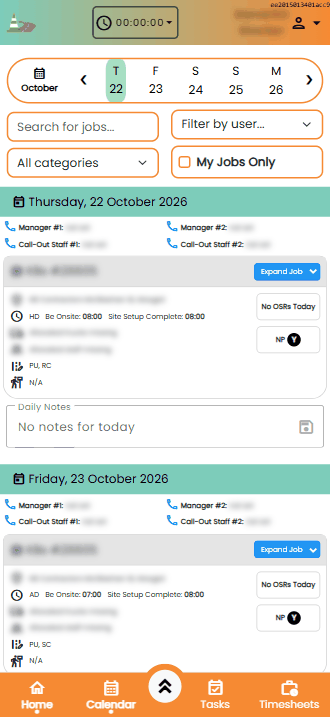
The Calendar is the app's home screen. It shows a week of jobs, one day under another, as job cards.
The Calendar (client details blurred)
## Choosing the dates
* Tap a day in the week strip at the top to jump to it. Use **❮** and **❯** to move a week back or forward.
* Tap the calendar icon (with the month name) to pick a date range. **Today** takes you back to the current week.
## Search and filters
* **Search for jobs...**: search the week's jobs.
* **All categories**: show one job category only.
* **Filter by user...**: show the jobs one staff member is allocated to.
* **My Jobs Only**: show only the jobs you're allocated to.
## The day header
Each day starts with:
* the date, and a coloured dot for each [special event](/eboard/settings/special-event-dates.md) that day. Tap a dot to see what it is.
* **Manager #1** and **Manager #2**, and **Call-Out Staff #1** and **Call-Out Staff #2**, for that day. Tap the phone icon next to a name to call them.
At the bottom of each day are the **Daily Notes**. Office users can edit and save them here; field staff can read them.
## Job cards
Each card shows:
* the client and job number, and a label if the job is **CANCELLED** (before or after leaving base), a **CALLOUT** or **LATE BOOKING**, or **HALF-SETUP** / **FULLY-SETUP**
* the location
* the duration and start times
* allocated trucks and staff
* traffic and pedestrian closures
Down the right-hand side:
* **Extra info**: tap to read the day's job note (only shown when there is one).
* **On-site records done today**: a tick when a toolbox briefing has been done, the number of site inspections, and an **A** when a site audit has been done. **No OSRs Today** means none have been recorded yet.
* **NP**: whether no-parking is needed. **Y** is green when it's done and red when it isn't; tap it for the details. **NA** means it isn't needed.
Tap **Expand Job** to open the [job screen](/mobile-app/job-screen.md).
---
# Agent Instructions
This documentation is published with GitBook. GitBook is the documentation platform designed so that both humans and AI agents can read, navigate, and reason over technical content effectively. Learn more at gitbook.com.
## Querying This Documentation
If you need additional information that is not directly available in this page, you can query the documentation by asking a question.
Perform an HTTP GET request on the following URL with the `ask` and `goal` query parameters:
```
GET https://wiki.roaddirect.co.nz/mobile-app/calendar.md?ask=&goal=
```
`ask` is the immediate question: it should be specific, self-contained, and written in natural language.
`goal` is what the user is ultimately trying to achieve, the reason they need the answer. Sharing it helps GitBook give you a better, more relevant answer. A goal is most helpful when it describes the outcome the user wants rather than restating the question. For example, with `ask=how do I create an API token`, a goal like `automate deployments from our CI pipeline` lets GitBook tailor the answer to that use case.
The response will contain a direct answer to the question and relevant excerpts and sources from the documentation.
Use this mechanism when the answer is not explicitly present in the current page, you need clarification or additional context, or you want to retrieve related documentation sections.